Fraud and security
What is smishing? SMS phishing explained
People trust the companies they do business with to protect their personal information. In our 2025 State of customer communications research, we found that 84% of Americans believe the companies they interact with are responsible for their digital privacy.
Cybercriminals know this and exploit this trust through smishing (SMS phishing). These ever-evolving text-based scams impersonate brands to steal sensitive data, tricking victims into revealing passwords, financial information, and other sensitive details that can lead to identity theft and drained bank accounts.
Whether you’re a business owner worried about employee security or an individual trying to protect your finances, understanding smishing is your first line of defense. Here’s what you need to know about how smishing works and how to spot it before it does damage.
What is smishing?
Smishing is an attempt to trick or manipulate individuals or businesses into revealing sensitive or valuable personal information like passwords, banking credentials, and Social Security numbers through Short Message Service (SMS) and other forms of text messaging.
The term itself comes from combining “SMS” and “phishing” to create “smishing,” making it a form of phishing specific to mobile devices. While phishing emails have existed for decades, smishers specifically target people through text messaging.
Smishers send deceptive text messages that appear to come from legitimate companies like financial institutions or trusted contacts. They design these messages to manipulate recipients into revealing personal data like:
- Passwords
- Credit card numbers
- Social security numbers
- Banking information
- Login credentials
Phishing scams overwhelmingly target user credentials, with 80% of attacks designed to steal login information through fake pages and fraudulent forms.
Once fraudsters steal this information, they can put it to use in multiple ways. They might sell it on the black market, commit identity theft, drain bank accounts, or reroute payments into their own pockets.
Scammers also spoof phone numbers or use text-to-email tools to hide their real origin, making attacks harder to trace. SMS spoofing allows fraudsters to mask their identity and appear as legitimate senders.
Smishing has become a common method for scammers simply because text messages yield results. SMS messages have a 98% average open rate, meaning scammers have an almost guaranteed audience for their fraudulent schemes if people don’t know what to look for.
How smishing works
A smishing attack unfolds using social engineering techniques, spoofed phone numbers, and malicious URLs designed to extract login credentials, financial data, and personally identifiable information (PII) from mobile device users before detection. Here’s the step-by-step breakdown of how these scams can play out:
1. The scammer obtains a victim’s phone number
Fraudsters get phone numbers through data breaches, purchased contact lists, or even sometimes by simply guessing numbers in densely populated area codes.
2. They send a text that looks legitimate
The notification is designed to look like it comes from a trusted source, like the victim’s bank, a delivery service, a government agency, or even a colleague. The scammer’s phone number or identifying information often looks close enough to the real thing to pass inspection.
3. The message creates urgency
The text creates a sense of urgency through social engineering and tells the recipient something requires immediate action like:
- Your account has been compromised
- A package couldn’t be delivered
- You owe money
- You’ve won a prize
The goal is to make the victim act quickly without thinking.
4. The victim is asked to take action
The message instructs the recipient to click a link, fill out a form, verify account information, or reply with sensitive details. Every request is designed to either steal information directly or, in rarer cases, install malware on the device.
5. The victim clicks or responds
If the recipient engages with the message, they can be led to a fake website or login page where they enter information, or they click a link that installs malware like spyware or even ransomware on their phone. This software monitors keystrokes and steals passwords.
6. The scammer uses the information
With stolen credentials in hand, fraudsters can access bank accounts, commit identity theft, or sell the victim’s information to other criminals. The longer it takes the victim to realize what happened, the more damage the fraudster can do.
Types of SMS phishing attacks
Smishing scams use different tactics depending on what the scammer wants to steal and who they’re targeting. Understanding common types of smishing attacks and smishing tactics can help you spot them before you fall victim. Here are the patterns you’ll see most often:
- Financial and account security scams: Fraudsters send fake alerts claiming your bank account has been compromised, suspicious activity was detected, or your credit card was used for an unauthorized purchase. They pressure you to verify your information or change your password immediately.
- Delivery and logistics scams: These messages claim a package couldn’t be delivered and ask you to confirm your address or pay a redelivery fee. Scammers might try to impersonate major carriers like UPS, FedEx, or retailers like Amazon.
- Prize and reward scams: You receive a text saying you’ve won a gift card, contest, or sweepstakes. All you need to do is claim your prize by filling out a form or clicking a link to verify your information.
- Tax and government impersonation: Fraudsters pose as tax authorities or government agencies, claiming you owe money with serious consequences if you don’t pay immediately. Or they’ll say you have an unclaimed tax refund waiting for you.
- Verification code requests: Scammers can use phishing to trick users into entering verification codes (like multi-factor authentication codes) on fake sites. They claim you need to confirm a money transfer, purchase, or password change that never actually happened.
- Invoice and payment scams: Invoice scams are best documented in email phishing, but occasionally they’re delivered via SMS. This could look like a fake invoice from a service claiming you owe money. Paying the invoice gives them both your money and your payment information.
- Impersonation of contacts: If someone’s information gets compromised, scammers can send messages that actually come from their phone number. They’ll claim to have an emergency or need immediate help, exploiting your trust in that person.
Smishing vs. phishing vs. vishing
Smishing isn’t the only way scammers try to steal information. The main difference between these three terms comes down to the communication channel fraudsters use to reach you.
Here’s how each one works:
| Definition | Example | |
| Phishing | An umbrella term for any scam that tricks people into revealing sensitive information through deceptive messages. Phishing most commonly happens through email, where scammers send messages with malicious links or fake login pages designed to steal your credentials. | You receive an email claiming to be from your bank asking you to verify your account by clicking a link and entering your password. |
| Smishing | Refers specifically to phishing attacks conducted through SMS text messages. | You get a text claiming a package delivery failed and asking you to click a link to reschedule. |
| Vishing (voice phishing) | Happens over phone calls, where scammers impersonate legitimate organizations and pressure you to share personal information. | Someone calls claiming to be from tech support and asks for remote access to your computer to “fix” a security issue. |
Examples of smishing texts
Smishing messages from cybercriminals impersonating big brands like Apple, FedEx, Walmart, and other major brands use fraudulent URLs to steal login credentials and payment information from SMS recipients. Here are three example scenarios that can help you stay alert.
Bank security alert
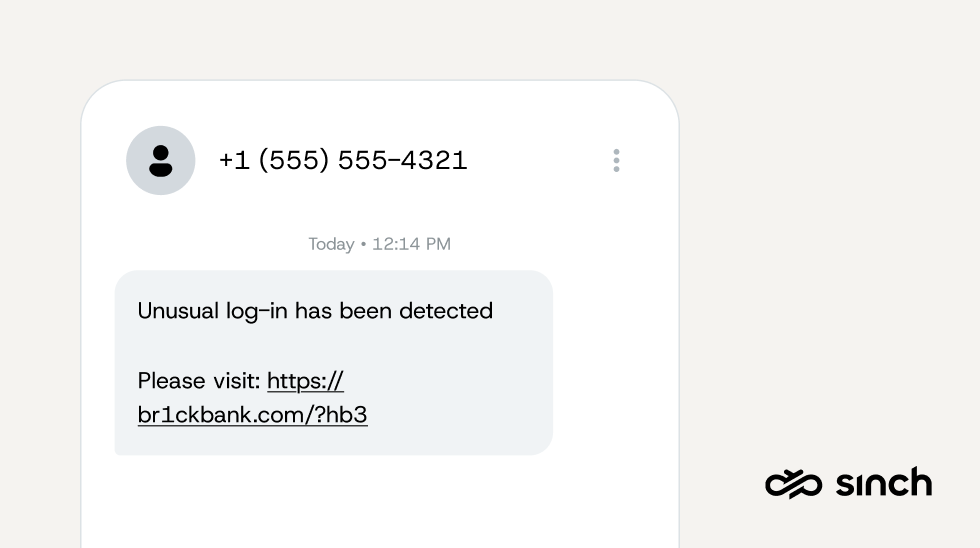
You’re checking your phone during lunch when a text pops up from what appears to be Chase Bank. The sender shows up as “Chase,” and the message warns that unusual login activity has been detected on your account. It includes a link to verify your identity and secure your account immediately.
“Unusual log-in has been detected on your Chase account. Verify your identity here: https://chase-secure-verify.com/login”
The message looks professional, and the urgency feels real. But look closer at the URL. A legitimate Chase link would be chase.com, not a domain like “chase-secure-verify.com.” Scammers add official-sounding words to make fake URLs appear legitimate. That small detail is the only thing standing between you and handing over your login credentials to a scammer.
Package delivery failure
It’s the holiday season, and you’re expecting multiple deliveries. A text arrives saying your package from a major shipping carrier couldn’t be delivered due to an incomplete address. The message asks you to click a link to update your shipping information so they can attempt redelivery.
“FedEx: Your package could not be delivered due to invalid address. Update your delivery details here: https://fedex-tracking.com/update3847”
You don’t remember ordering anything recently, but with so many purchases this time of year, it’s easy to second-guess yourself. The scammer is counting on that confusion. Once you click the link and enter your address, payment details, and contact information, they have everything they need to steal your identity or make fraudulent purchases.
Pro tip: Look for suspicious URLs with misspellings, spelling errors, urgent language demanding immediate action, and sender numbers that don’t match the company’s official contact information.
Congratulations, you’ve won!
A text message arrives announcing you’ve won a $500 gift card from a popular retailer. All you need to do is claim your prize by clicking the link and filling out a brief survey to confirm your eligibility. The message mentions you were selected based on your recent purchase history. It could sound something like:
“Congratulations! You’ve been selected to receive a $500 Target gift card based on your loyalty. Claim here before it expires: https://target-rewards.net/claim?id=9847”
The promise of free money is tempting and the reference to your purchase history makes it feel personalized. But there was no contest, no selection process, and no gift card. The “survey” is designed to collect your personal information, and in some cases, the scammers will even ask for a small processing fee to claim your prize, stealing both your data and your money.
Common smishing message scripts
Here are additional examples of the language scammers use in smishing attacks:
- Tax refund scam: “IRS Refund Alert: You are eligible for a tax refund of $1,847. To avoid expiration, verify your info now: irs-refunds.secure-verify.com”
- Verification code exploitation: “Your bank account verification code is 847293. Reply with this code to confirm your recent $2,450 transfer.”
- Fake invoice: “A charge of $399.99 for your Norton subscription renewal was just attempted. If unauthorized, dispute here now: [link]”
- Trusted contact impersonation: “Hey, this is Mark from work. I’m in a bind and my card isn’t working. Can you Venmo $200 to @mark.pay? I’ll pay you back tomorrow.”
- Account suspension threat: “Your Netflix account has been temporarily suspended due to failed payment. Update details immediately or your service will be canceled: [link]”
How can you protect yourself from smishing?
Remember, as a company, there are two ways smishing can hurt you. It can hurt your individual employees, and it can hurt your entire company. It depends on the nature of the cyberattack.
If the smishing attack includes a link that uploads malware or ransomware to your company systems, the attackers could gain access to contact information of your employees and other private information.
This is one way smishers send texts that look like they are from people you know. They compromise that person’s information, and use your trust in them to try to trick you into sharing valuable personal data.
So, what can you do to prevent smishing attacks? Here are the most important defenses you can put in place.
- Don’t click links from unknown senders: If you don’t recognize the sender, don’t click anything in the message. Delete suspicious texts immediately and never respond to them, even to ask who’s contacting you.
- Contact the sender to verify an SMS text: Contact the company using official contact information you find yourself, not what’s provided in the text. Call the number on your credit card, visit the company’s official website, or use their verified mobile app to confirm whether the message is real.
- Look for red flags in the message: Smishing texts often contain spelling errors, grammatical mistakes, or suspicious URLs with misspellings or extra characters. Legitimate companies use their official domain names and professional communication standards.
- Never share sensitive information via text: Real companies won’t ask for passwords, credit card numbers, social security numbers, or account credentials through text messages. Any request for sensitive data via SMS is a scam.
- Enable multi-factor authentication: Multi-factor authentication (MFA) adds a security layer that requires a second form of verification beyond your password. It blocks scammers from accessing your accounts even if they’ve stolen your login credentials.
- Keep your software updated: Software updates include security patches that protect against malware, spyware, and other threats. Update your phone’s operating system, messaging apps, and security software as soon as updates become available.
What businesses can do to prevent smishing
Smishing doesn’t just threaten individuals. It poses serious risks to businesses whose employees, customers, and systems become targets for fraud. Understanding smishing tactics helps organizations build stronger defenses against these evolving threats.
Make employee training a priority
Your employees are your first line of defense against smishing attacks. Regular training sessions should cover how to identify suspicious messages, what tactics scammers use, and why clicking unknown links on company devices creates security vulnerabilities. The more your team knows about smishing, the less likely they are to fall for it.
Establish clear reporting processes
Create straightforward protocols for employees to report suspicious messages without fear of judgment or consequences. Your IT security team needs to know about potential threats immediately so they can assess the risk, warn others, and take protective measures. Make reporting simple and accessible.
Strengthen your cybersecurity measures
Implement security tools that detect and block malicious links, monitor for unusual account activity, and restrict access to sensitive systems. Multi-factor authentication, regular security audits, and updated software create layers of protection that make it harder for scammers to compromise your business.
Protect your customers with verified messaging
Verified messaging helps customers distinguish your legitimate messages from scams impersonating your company. More than half of consumers report receiving legitimate messages from brands that seemed suspicious in the last year.
That’s why some brands are turning to channels like RCS or WhatsApp, which allow for verified sender profiles that display a brand’s official logo, brand name, brand color, and a verified checkmark inside the messaging thread. This way, customers instantly know they’re speaking to a trusted brand.
Research shows that 59% of consumers prefer RCS messages with verified sender IDs over basic SMS because they trust them more for account verification and security.
Last but not least, remember that SMS marketing should go hand-in-hand with your email marketing efforts. The best marketers use SMS and email together for a balanced strategy that builds customer trust.
The bottom line
SMS is an amazing communication tool for businesses, offering a direct and efficient way to engage with customers and employees. However, it’s important for all of us to be wary of texts from unfamiliar companies and stay vigilant against the threat of smishing.
Here are a few key takeaways to pass on to your employees about SMS phishing:
- Verify the sender: Verify the authenticity of SMS messages, especially those requesting personal or financial information.
- Exercise caution with links/attachments: Don’t click on links from texts that you don’t recognize. Be cautious even if the message appears to be from a known contact.
- Report suspicious messages: Promptly report any messages that raise doubts or appear to be phishing attempts.
Training your employees is just one of many things businesses can do to prevent SMS phishing. This entails educating both employees and recipients about tactics employed by fraudsters, and enhancing cybersecurity measures to detect and thwart smishing and related scams like SIM farm fraud.
Smishing is not just a consumer problem – it’s a trust problem. Messaging is a critical channel for customer engagement, so businesses have a responsibility to protect users. And when customers know who they’re hearing from, they’re far less likely to fall victim to scams.
Check out our resources to help your business prevent fraud in business messaging. Or, learn about how Sinch SMS for operators can help you mitigate SMS fraud.
Smishing FAQs
If you accidentally click a suspicious link, act quickly to reduce potential risk. Disconnect your phone from Wi-Fi and cellular data to prevent any further communication with malicious systems. Run a security scan using trusted mobile security software, and change passwords for any accounts that may have been exposed, especially banking, email, and work accounts.
Closely monitor your financial statements and account activity for unusual behavior. If sensitive information may have been compromised, contact your bank or card issuer immediately so they can take protective action.
Legitimate business messages are typically clear, professional, and specific. Be cautious of texts that use urgent or threatening language, generic greetings, spelling or grammatical errors, or links with unusual or misspelled domains.
Many businesses now use verified messaging channels, such as RCS, which display official sender names, branding, and verification indicators. These signals help confirm the message is coming from the real organization.
If a message seems unexpected or lacks verification, avoid clicking links or replying. Instead, contact the company directly using contact details from its official website or app.
Yes. Some smishing attacks rely on direct responses rather than links. Scammers may ask you to reply with personal information, account details, or verification codes. Even responding “yes” or “no” can confirm that your number is active, increasing the likelihood of future targeting.
Additionally, sophisticated malware can sometimes exploit vulnerabilities through a simple message, though this is less common. The safest approach is to avoid responding to unexpected messages that request information or action.
Yes. Smishing is increasingly used to target employees and organizations. Attackers often impersonate executives, IT teams, vendors, or business partners to pressure employees into sharing credentials, approving fraudulent payments, or installing malicious software onto company systems. Employee training and verification protocols are essential defenses against business-focused smishing.

Author: